Hotel Lobby AI video example: a six-second anime case study
Watch the six-second duet alongside its character references. The cast stays recognizable in the sampled frames, but the camera loses the full-body shot.
On this page
This six-second AI video puts two original anime characters in an orange performance studio: a woman on the left, a man on the right and a microphone hanging between them. The sampled frames keep the characters recognizable. The camera also moves close enough to crop their legs, despite the request for a full-body shot.
The Seedance 2.5 demonstration was separately authorized. It covers anime characters only. Video Hotel Lobby's personalized generation and checkout are unavailable, and the real-person API integration is still in progress. The settings recorded here aren't available for customers to select.
Watch the six-second clip
Watch the clip once, then replay it while watching the performers' feet. Are both complete shoes still visible near the end? Picking one detail makes it easier to say what went wrong than judging the whole clip as good or bad.
The two character references
The left reference was an adult red-haired anime woman with long hair, ribbons, a red, white and dark outfit, and distinctive footwear. The right reference was an adult black-haired anime man in a dark jacket and trousers with a light shirt. Each reference has one full-body figure against a simple background. Their silhouettes and clothes make them easy to tell apart.
These are the two inputs for this task. One finished video doesn't tell us how other reference formats or character designs will behave. For a different cast, the original anime character guide explains how to prepare your own pair.
What the prompt asked for
The prompt asked for an original performance described in text. It supplied no footage of the original artists for motion transfer or character replacement. The woman was given the opening line, "Two voices, one stage," and the man the reply, "Make your story move." The prompt also requested original music and distinct adult voices. These lines describe the request; the existing review didn't verify them against the soundtrack.
| Item | Recorded value |
|---|---|
| Actual model | doubao-seedance-2-5-260628 |
| Reference roles | Image1 left; Image2 right |
| Requested resolution and ratio | 720p, 16:9 |
| Display export | 1280 × 720; 6.000 seconds; 24 frames per second |
| Display file | MP4 with H.264 video and AAC audio |
| Sample size | One authorized generation task |
The model identifier records which version made this example. Seedance 2.5 settings and live quotes aren't available in the customer studio. The file specifications don't tell you what a future task would cost or how long it would take.
What the twelve frames show
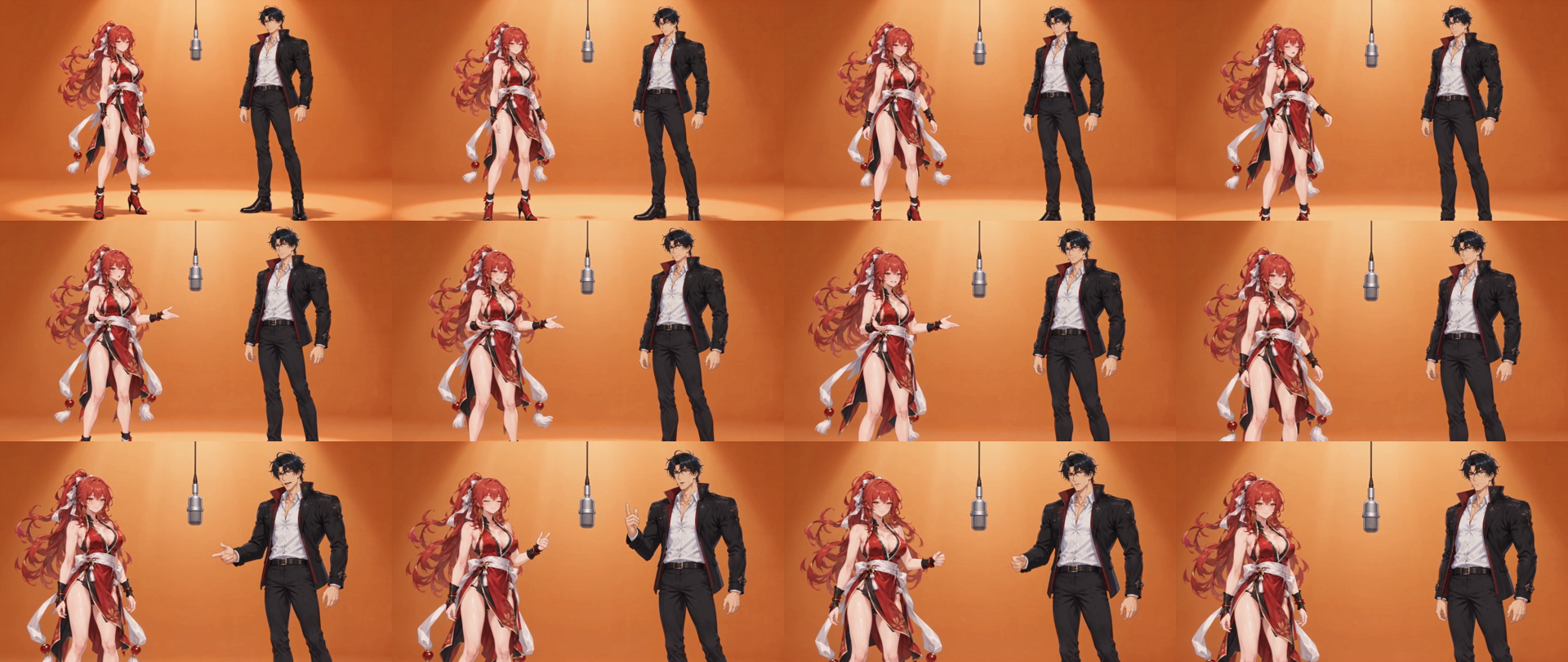
The recorded review checked twelve sampled frames and video playback. In those frames, the woman stayed on the left and the man on the right. The orange studio and one central microphone stayed visible, with no extra characters, extra limbs, text or watermark noticed. The check covers those samples. It doesn't establish a clean result in every frame or predict a future generation.
In the frame sequence below, the outfits remain distinct while the hand gestures change. The camera keeps moving closer. By the later samples, you can recognize the characters but can't see their complete bodies. That's the detail to watch for when the opening frame looks promising.
When the shoes leave the frame
The prompt asked for a wide, full-body shot with both complete shoes visible throughout. It also allowed a subtle, gentle camera push, provided nothing was cropped. The push itself was allowed. The shoes leaving the frame was the failure: the review places the first cropping around one to one-and-a-half seconds, with more of the legs lost later.
Both input images show the shoes. Sending a complete figure therefore didn't keep the whole figure in view throughout the video. The shot needed enough room below the feet, above the heads and around the movement to accommodate the camera change.
For another attempt, the change worth trying would be a static camera and more space above the heads and below the feet. That adjustment hasn't been tested. If gestures and expressions matter more than full-body movement, an upper-body shot could also work. Decide which version you want before generating so you have something definite to check.
What we checked about the sound
The display file has an AAC audio track and played to the end without a recorded player error. The existing review didn't include independent listening or a transcript. Voice quality and precise lip sync still need checking.
Listen for how the two parts meet and how the clip ends. If you add music in an editor, moving the track can change when a beat lands, but it won't redraw the generated mouth movements. The audio and framing checks cover what to inspect before keeping the edit.
Why there are two video files
The original model output is preserved. Its recorded video duration is about 6.042 seconds; its container duration is 6.08 seconds. A separate display export was trimmed to exactly 6.000 seconds at the same 1280 × 720 resolution and 24-frame rate, retaining the video and audio through that endpoint. The trim involved no extra generation, character replacement or compositing.
Keep the original when you make a display edit. Here it records what the model returned, while the trimmed copy supplies the exact six-second clip on the page. If a publishing format needs that precision, check the downloaded file's duration. This display export doesn't show that the model always returns an exact six-second container.
Use the same checks for your own pair
For your own pair, use distinct references and write down the left and right roles before describing a short scene. Then review the characters, movement, framing and sound against what you asked for. A clip can still be worth keeping when one detail misses the brief, as long as you know which compromise you're accepting.
Use the complete preparation guide to plan the scene and the image requirements guide to choose the references. The pricing page describes four offers, but live task quotes and checkout are unavailable. There are no free personalized generations or signup credits. You can study this demo while customer generation remains closed.
Sources and review date
This case study uses the saved generation request, original output, display export and review records from October 7, 2026. It covers one generation and twelve sampled frames.